Teardown No.01 · May 2026
Claude Design: Prompt to Prototype, Pulled Apart
Real tool, or just scary to Figma's stock? A working guide to getting the most out of Anthropic's design preview, for less.
Captured July 2026. The product moves weekly; the method of pulling it apart does not.
The entrance, and the real question
On April 17, 2026, Anthropic shipped Claude Design, and Figma's stock fell 7 percent the same day. Three days earlier, Anthropic's chief product officer Mike Krieger, co-founder of Instagram, had quietly resigned from Figma's board. The filing cited no disagreement. The timing spoke for itself. Google's Stitch had already taken a swing at the category in March, so by the time Claude Design arrived, the design-software market was already nervous, and it flinched.
Figma finished the month down 16 percent, though a broader cloud-software sell-off that week did some of that damage, so the clean, attributable number is the 7 percent on launch day. Either way, the message was loud.
That is a dramatic entrance. For a builder, it is also beside the point.
You do not trade FIG. You ship things. The market's reaction tells you the threat is real enough to move billions in market value, which is worth knowing, but it says nothing about whether the tool is any good or what it costs to use. Those are the two questions that matter from where you sit, and they are what this teardown answers. No stock charts, no SaaSpocalypse think-piece. What it really does, what it really costs, where it falls down, and how to run it without burning your week in 36 minutes.
The verdict: real, with caveats
Claude Design is not vaporware, and it is not a faked screenshot. Anthropic Labs shipped it on April 17, built on the new Opus 4.7 vision model, and there are paying companies using it in production today. The market did not erase billions from Figma over nothing.
But real and finished are different words. This is a research preview. Anthropic says so plainly, and it ships with bugs the company documents itself. It is a complement to the tools you already use, not a replacement, which is why it ships a Canva handoff and a Claude Code handoff rather than trying to be everything. Both things are true at once: genuinely useful, genuinely unfinished.
Signposting is color-coded throughout. Green is solid and verified against Anthropic's own docs. Amber means handle with care. Red flags a gotcha that catches people out. Every source is on the sources page so you can check the work yourself.
What it actually is
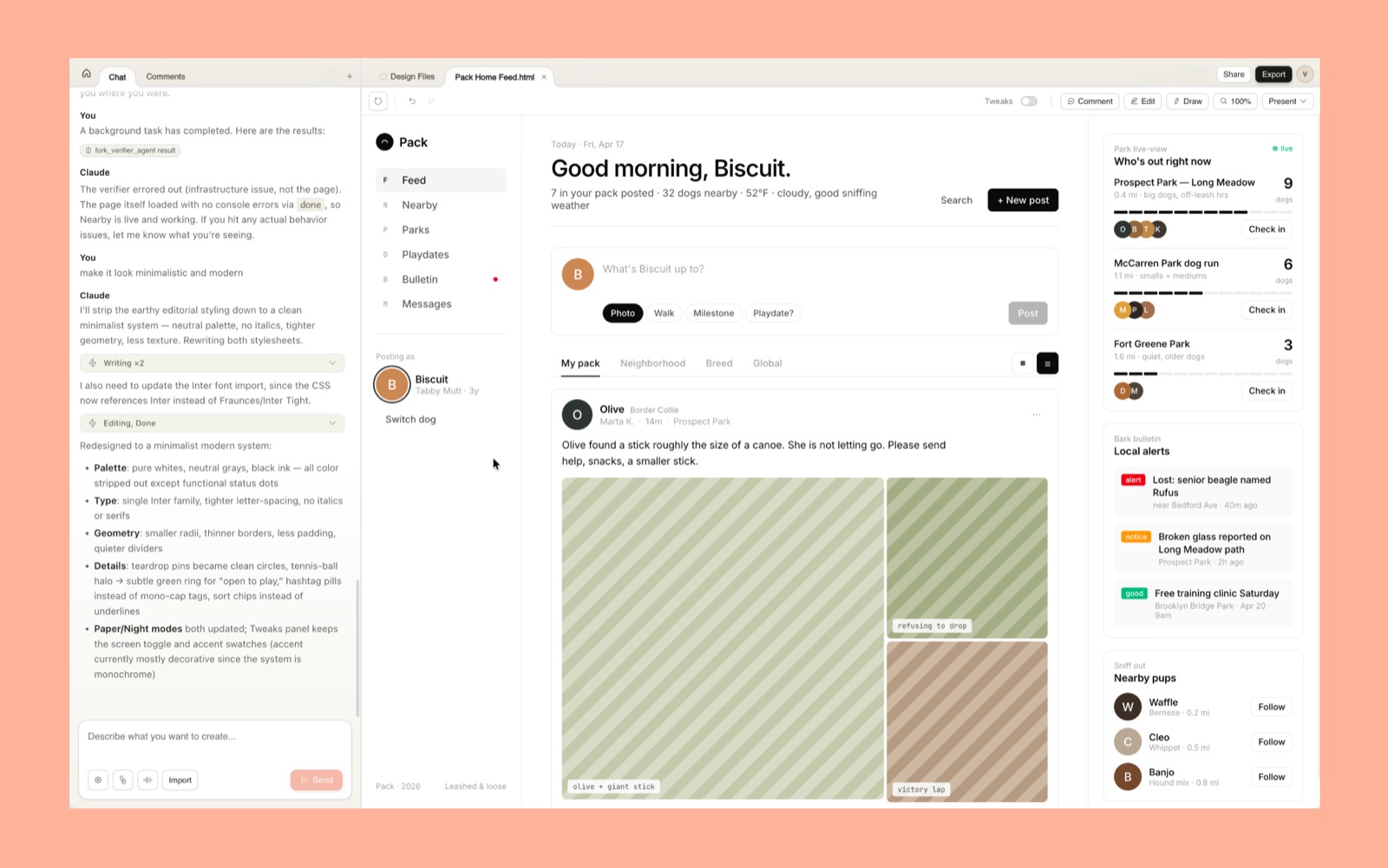
Underneath the marketing, the shape is simple: a chat panel on the left, a live canvas on the right. You describe what you want, Claude builds a working version on the canvas, and you refine it by talking to it. The output is real code running in the browser, not a flat image.
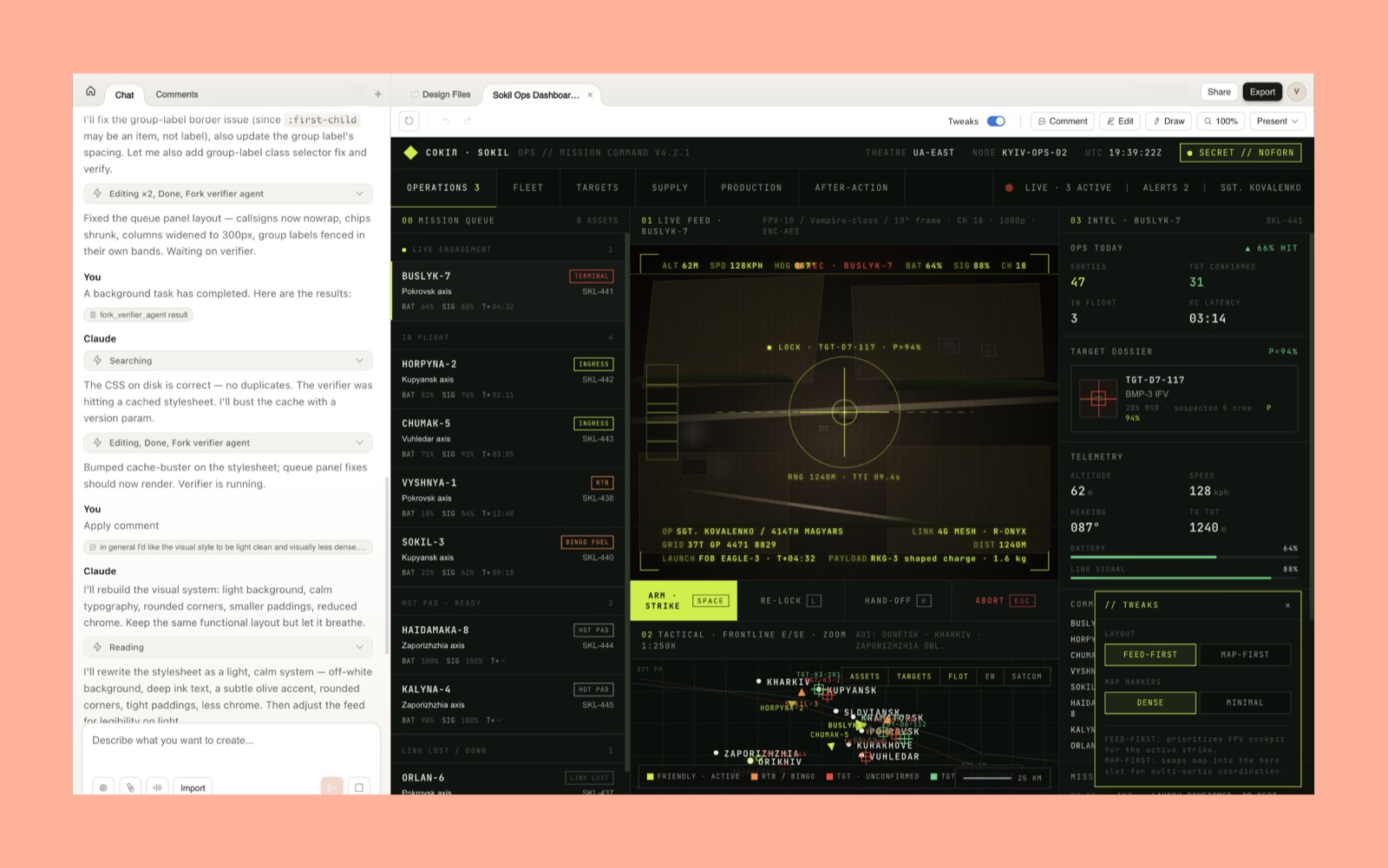
What you're actually getting:
- Built on Opus 4.7. Anthropic's vision model. It reads your screenshots and design files as real inputs.
- Web only, no free tier. It lives at claude.ai/design and needs a paid plan.
- Real imports, real sharing. Brings in DOCX, PPTX, XLSX, images and your codebase; shares private, view-only, or full edit access for group work.
The flow: where quality is decided
Output quality is decided in the first two steps, not the last. Skipping the setup is the most common mistake, and it is why so many results look like every other AI mockup.
- Build the design system first. During onboarding, Claude reads your codebase and design files and builds a reusable system of your colors, type, spacing and components. Every project after that inherits it. Skip it and the model defaults to generic. No assets yet? Define colors, fonts and tone in plain chat first, then bring them in.
- Feed context, then branch freely. Upload screenshots, link a repo, or use the web capture tool to pull elements off your live site. To explore a new direction, tell Claude to save what you have and try another approach; it preserves the version so you can return.
Four ways to refine, and your budget dial
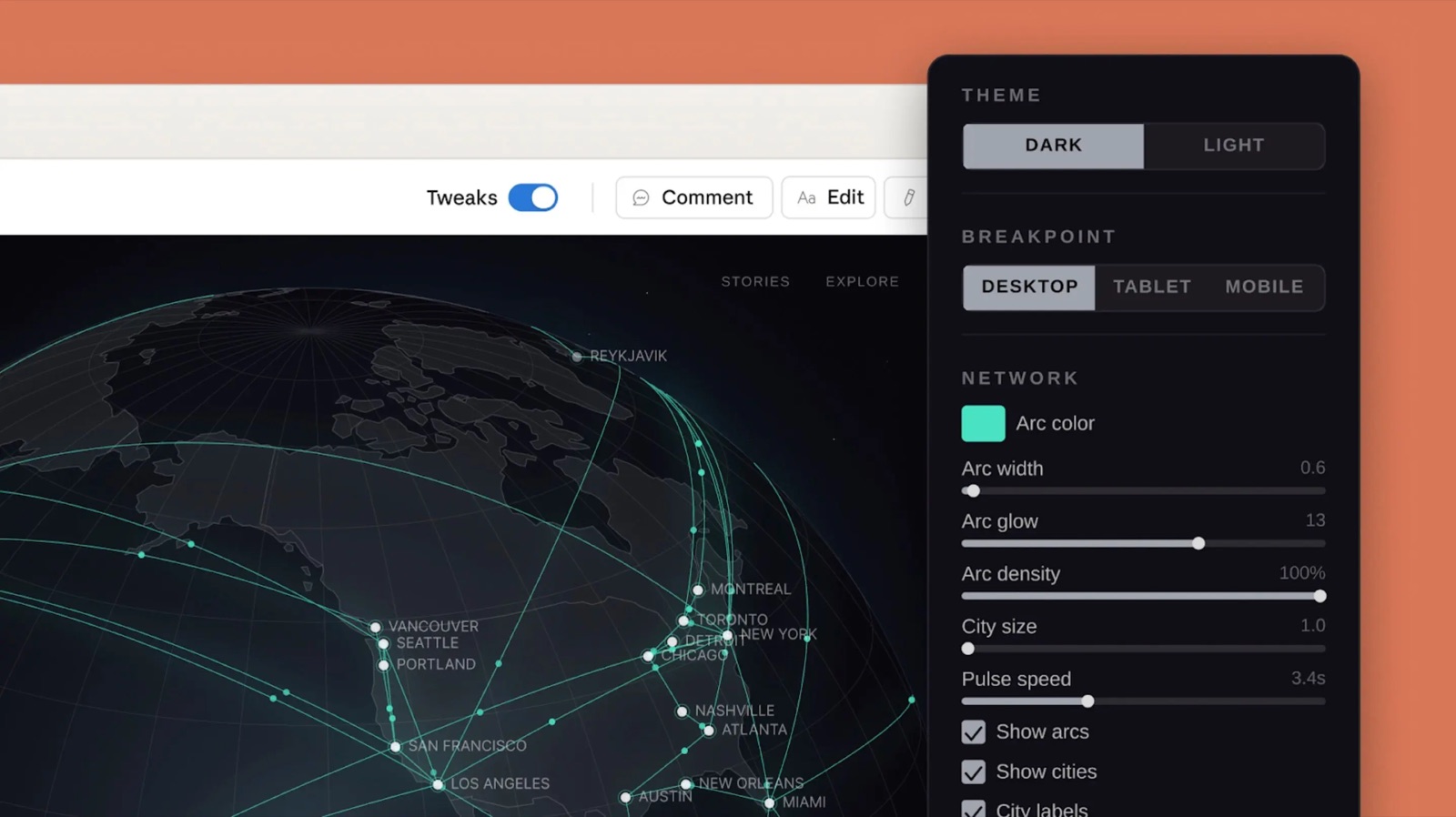
There are four ways to change a design, and they are not interchangeable. Two cost a prompt; two are free. Knowing which is which is the single biggest budget habit in the product.
| Method | What it is for | Cost |
|---|---|---|
| Chat | big structural moves | Costs a prompt |
| Inline comment | targeted element change | Costs a prompt |
| Direct text edit | click and type | Free |
| Sliders / Tweaks | drag to tune live | Free |
Rule: if a slider or a hand-edit can do it, never spend a prompt.
The budget reality
Straight from Anthropic's pricing docs: Claude Design is priced and metered independently from the rest of Claude. It has its own weekly limits that sit alongside, not inside, your chat and Claude Code limits. Design activity never draws down those allowances. It is a separate weekly bucket that resets every seven days.
| Plan | Where it fits |
|---|---|
| Pro $20 | one-off exploration |
| Max 5x $100 | semi-regular mock-ups |
| Max 20x $200 | power use, designers and creatives |
| Team / Enterprise | per-seat weekly allowance; off by default on Enterprise |
Stretching the bucket
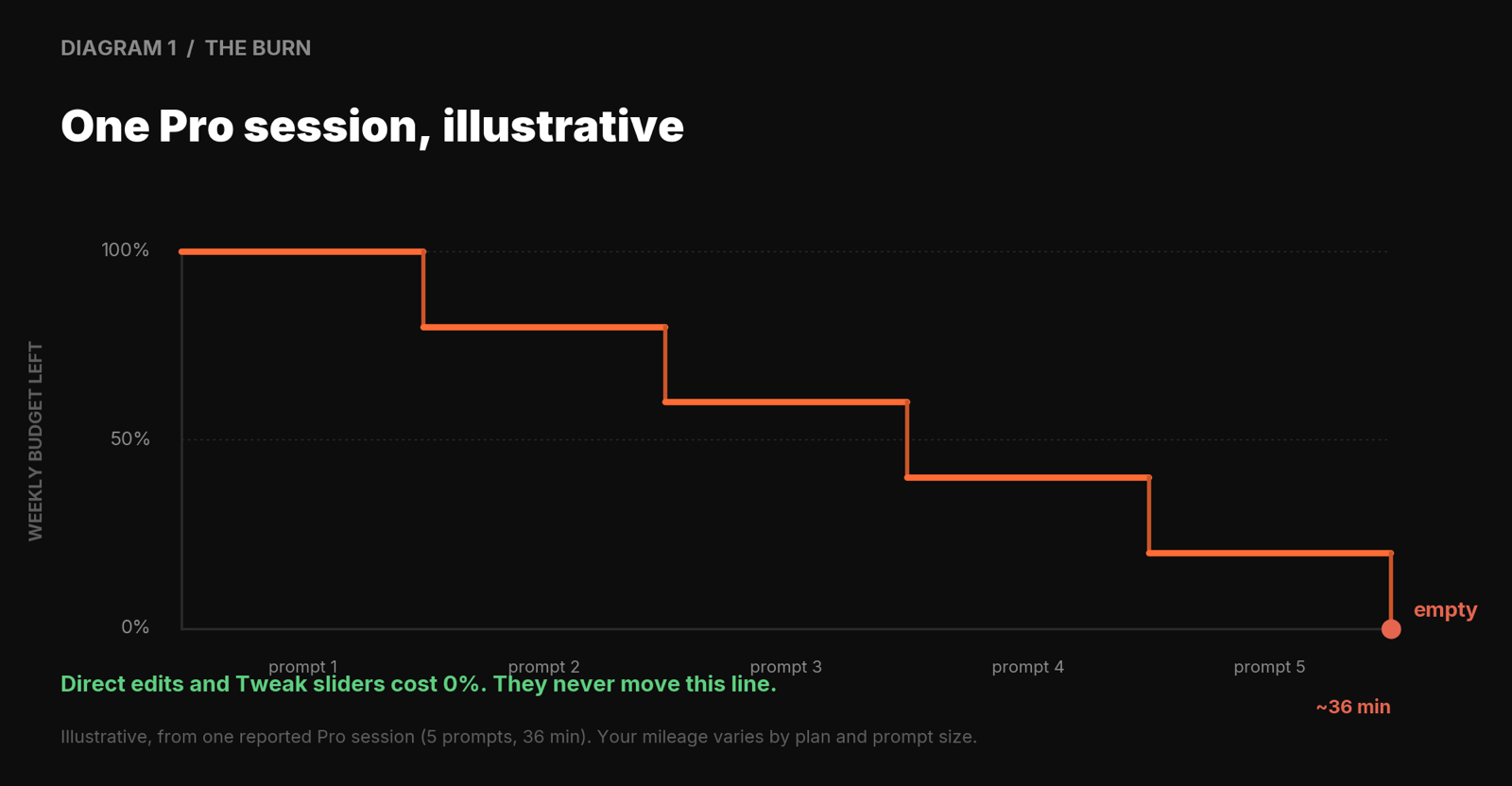
It is token-heavy and the weekly cap is real. One reviewer exhausted a week of Pro credits in 36 minutes, which was five prompts. Treat Pro as try-it-out and Max as use-it-weekly. These four habits make the bucket last:
- Set up the system and feed context first. A sharp first output saves three rounds of correction, and corrections are prompts.
- Write dense, single-paragraph prompts. Name the audience, the content and the visual feel in one go. Vague prompts almost never land, and every miss is a prompt gone.
- Ask for variations in one prompt. Request two or three directions at once instead of regenerating one at a time.
- Refine with sliders and hand-edits, not chat. If a slider or a direct edit can make the change, never type it. The biggest budget saver in the product.
Anthropic throttles harder during peak hours, defined as 5 to 11am Pacific. That is a platform-wide policy; whether it touches the separate Design budget specifically is not confirmed. If it does, the same work eats your cap faster, so shift heavy sessions outside that window where you can.
The edge: the handoff loop
If there is one thing to take from this report, it is this. Export options are table stakes. What separates Claude Design is the handoff loop: a finished design packaged into a bundle that Claude Code builds from, in one instruction.
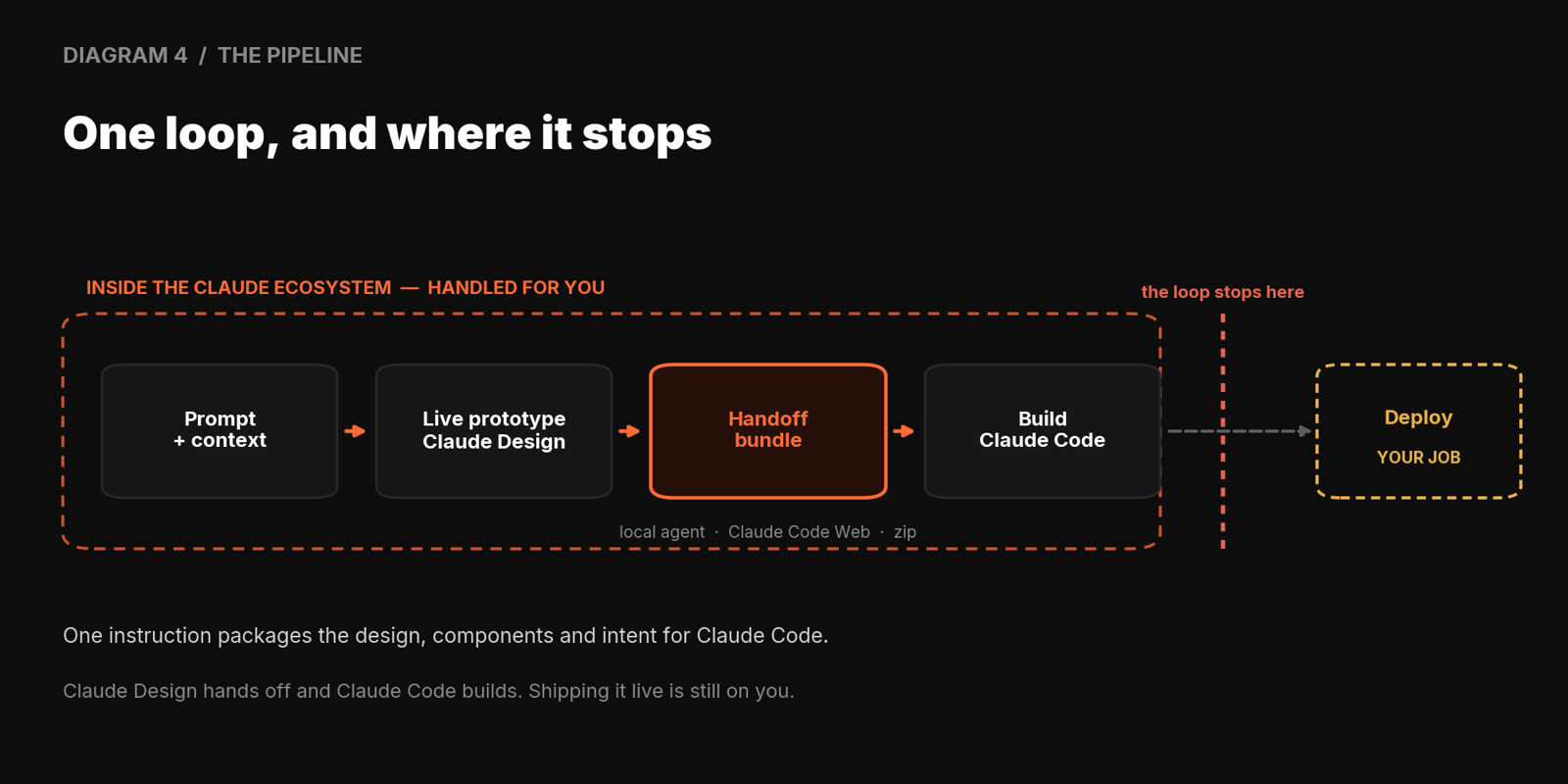
Most AI design tools hand you a picture. This one hands the next tool a brief, the design, the components and the intent. The vendor proof point (Brilliant cutting a 20-prompt rebuild to two) is a customer quote in a launch post, so read it as marketing: the direction is plausible, the exact multiple is a best-case headline.
The walls: where you will get stuck
It is a preview, and it bites in specific places. Anthropic's real, documented bug list is nothing like the single bug the hype mentions. Here it is, with the workarounds.
- Inline comments vanish before Claude reads them. Paste the comment text straight into chat instead.
- Save errors in compact view. Switch to full view and retry.
- Large codebases lag or choke the browser. Link specific subdirectories, not the whole monorepo.
- "Chat upstream error." Open a new chat tab inside the same project.
There is also a reviewer-reported quirk where the section editor grabs the wrong element when the Tweaks panel is open. Toggle Tweaks off before selecting a section. That one is not in Anthropic's official list, but enough reviewers hit it that it is worth knowing.
Animations are live React in the browser, so there is no native way to download them as video. A free third-party tool, claude2video.com, renders an MP4 from your share URL. It works, but it is not Anthropic, and that share URL carries an auth token. Fine for marketing animations; think twice before pasting anything client-confidential into a stranger's renderer.
Exports and the Figma wall
The export menu is exactly six: download as a zip, export as PDF, export as PPTX, send to Canva, export as standalone HTML, or hand off to Claude Code. That is the whole list.
People often go looking for an "Export Assets" or "Copy Markup" option. Neither exists, so do not waste time hunting. And Canva, the headline launch partner, is easy to miss in the menu, so do not overlook it.
The Figma wall: Claude Design cannot read a Figma file directly. There is no import button, and pasting a Figma URL does nothing. This catches design teams in week one. The route in is Claude Code's Figma plugin to extract your tokens into a format Claude can parse; the route out, from a Claude Design export back onto a Figma canvas, runs through a tool like Anima. Plan the token-extraction step before you migrate a system.
Common gotchas
A few things catch people out in the first week. None are dealbreakers, but knowing them up front saves time, budget and a support ticket.
- There is no direct Figma import. No button, no URL paste. Bring a system in through Claude Code's Figma plugin, covered in section 8.
- Deploy is still on you. Claude Design hands off and Claude Code builds. Shipping it live is a separate step you own.
- The export menu is six items, no more. zip, PDF, PPTX, Canva, standalone HTML, Claude Code handoff. If you are hunting for anything else, it is not there.
- Do not plan against budget numbers you read online. Burn varies wildly by plan and prompt size. Measure your own first session, then budget from that.
- It is Opus 4.7 underneath. That is why its vision and code handoff are strong. Worth knowing when you weigh it against anything older.
Get these into muscle memory and the tool stops surprising you. Everything after this is upside.
The call: should you use it?
For a builder, the decision is reasonably clean.
- Worth it if you are shipping landing pages, prototypes, pitch decks or marketing mockups, especially solo or in a small team, and you already work in the Claude and Claude Code ecosystem. The design-system onboarding and the handoff loop are where it earns its keep.
- Skip it, for now, if you need real-time multiplayer design, you are deep in an established Figma workflow with a mature component library, or you cannot tolerate a preview's rough edges on client-critical work. Anthropic itself does not pitch it for mission-critical use yet.
Most builders will land in between: use it for the fast zero-to-one pass, hand off to Claude Code to build, and keep Figma or Canva in the stack for what each does best.
Where it fits the stack
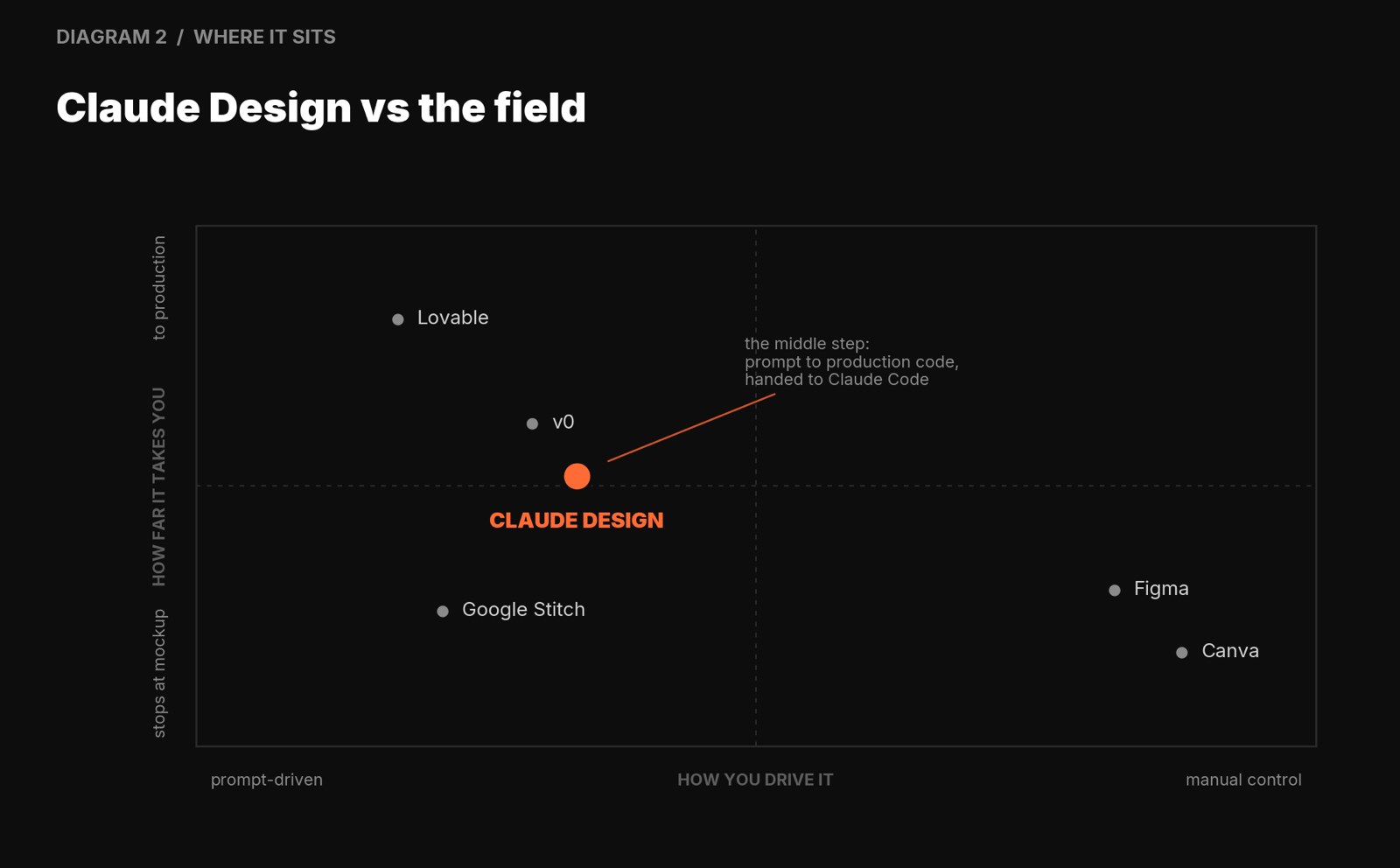
It does not replace Figma for multiplayer work or Canva for social assets. It replaces the awkward middle step of turning a prompt into production-ready code. It covers more than v0's React and stops short of Lovable's deploy, which is a feature if you want to own your pipeline.
If you would rather not pay the meter
Much of this report applies whether or not you stay inside Anthropic's ecosystem. If the metered weekly budget is the blocker, there is an open-source alternative that gained traction fast.
Open Design github.com/nexu-io/open-design
Roughly 40,000 GitHub stars in about two weeks. Apache-2.0, local-first, bring your own key. Rather than being its own model, it turns the CLI coding agents you already have (Claude Code, Codex, Cursor, Gemini CLI, OpenCode, Qwen) into a design engine, driven by composable skills and portable DESIGN.md systems.
- Why it dodges the meter. Bring-your-own-key means you pay model token cost directly, or run something cheap or local, and skip the separate weekly bucket entirely. The habits in this report transfer across unchanged, because they are model-agnostic.
- Check the name before linking it. Two projects exist. The 40k-star one is nexu-io/open-design at open-design.ai. A separate project called Open CoDesign (OpenCoworkAI, MIT, Electron) is not the same thing.
The sources
Do not take any of this on trust. Every claim above traces to one of these. Verify it.
- Anthropic launch postIntroducing Claude Design by Anthropic Labsanthropic.com/news
- Support: get startedGet started with Claude Designsupport.claude.com
- Support: pricing & usageClaude Design subscription usage and pricingsupport.claude.com
- PressTechCrunch, VentureBeat, Adweek, Motley Fool, Figma stock & Krieger board coveragevarious
- Hands-on reviewsMacStories, Builder.io, UXPilot, Muzli, vibecoding, Ocasio Consultingvarious
- Animation exportclaude2video.com, third-party, built by Tom Pavliclaude2video.com
- Open-source alternativeOpen Design by nexu-io (~40k stars)github.com/nexu-io/open-design
A research preview changes weekly. If a detail here has drifted, the primary sources are the truth, not this report. Re-check before betting anything on it.
Use it.
Don't worship it.
A fast, genuinely useful preview with one real edge and a stack of caveats. Set up the design system, feed context first, edit by hand where you can, watch the meter, and keep the sources close.
That is the guide. A real tool with one genuine edge, a handful of gotchas, and an open-source escape hatch if the meter wears thin. Set it up right and it pays you back fast. Now go build something and show your work.
The Forge: AI Builders & Creators
A community for people building real things with AI. Not posting prompts. Not chasing hype. Building. Founders, indie hackers, engineers, agency owners, anyone shipping agentic systems, automation, products or infrastructure. Show your work, share what is broken, get sharper.
Hosted by Sean Donahoe, founder of Ferrox Labs.